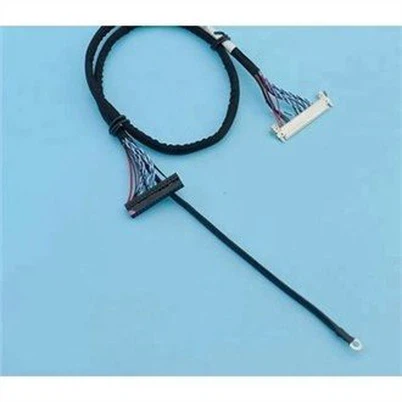
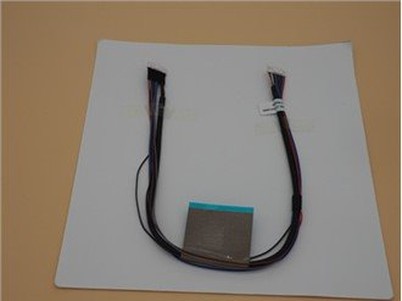
Computer Wire Harness
A computer wiring harness refers to a complex system of cables and lines that connect various components and devices inside a computer. These cables and lines carry data, power signals, and communicate between components within the computer. The design and layout of computer wiring harnesses have a vital impact on the performance, stability and heat dissipation of the computer.
Description
Why Choose Us?
Competitive Price
We are committed to providing our customers with the best quality products and services at competitive prices.
Quality Control
We have a strict quality control system to ensure that our products meet the highest standards of quality.
After-Sale Service
Our personnel are generally within the spirit of continuous improvement and excellence, and using the excellent top quality goods, favorable rate and superior after-sales expert services, we try to win every customer's believe in for Usb C Cable Data Transfer.
24H Online Service
If you have difficulties when using the product, we will respond to your needs as soon as possible and give you the greatest support.


What is Computer Wire Harness?
A computer wiring harness refers to a complex system of cables and lines that connect various components and devices inside a computer. These cables and lines carry data, power signals, and communicate between components within the computer. The design and layout of computer wiring harnesses have a vital impact on the performance, stability and heat dissipation of the computer.
Organized and Simplified Cabling
Wire harnesses provide a structured and organized way to route and connect cables within a computer system. This simplifies the installation and maintenance process, reducing the chances of tangled or ables.
Enhanced Reliability
Computer wire harnesses are designed to withstand the rigors of daily use and provide consistent, reliable connections between components. They are often made with high-quality materials and connectors, ensuring long-term performance.
Ease of Upgrades and Repairs
Modular or detachable wire harnesses allow for easier upgrades and repairs. Components can be replaced or upgraded without having to rewire the entire system, saving time and effort.
Increased Flexibility
Wire harnesses can be customized to fit specific computer configurations and requirements. This flexibility allows for tailored solutions that meet the unique needs of different users and applications.
Improved Aesthetics
Wire harnesses help to keep cables neatly routed and organized, improving the overall aesthetics of the computer system. This is particularly important in custom-built computers or high-end systems where cable management is crucial.
Reduced Electromagnetic Interference (EMI)
Properly designed wire harnesses can help to reduce electromagnetic interference (EMI) by keeping cables shielded and separated from potential sources of interference. This ensures better performance and stability of the computer system.
Enhanced Safety
Computer wire harnesses are typically designed to meet safety standards and regulations, ensuring that cables are not easily damaged or pose a safety hazard. This provides peace of mind to users and IT professionals.
Types of Computer Wire Harness
Internal Wire Harness:
This type of wire harness is found inside the computer case and connects the various internal components of the computer, such as the motherboard, CPU, memory modules, storage devices, power supply, and expansion cards. Internal wire harnesses typically include power cables, data cables, and fan cables.
Front Panel Wire Harness:
The front panel wire harness connects the buttons, switches, and indicators on the front of the computer case to the motherboard. This harness typically includes cables for the power button, reset button, power and HDD activity LED indicators, and front panel audio jacks.
Peripheral Wire Harness:
Peripheral wire harnesses connect external devices to the computer, such as keyboards, mice, monitors, speakers, and external storage devices. These harnesses may include USB cables, HDMI cables, DisplayPort cables, audio cables, and power cables.
Material of Computer Wire Harness
Computer wire harnesses are typically made from a variety of materials, depending on the specific requirements of the application. Here are some common materials used in the construction of computer wire harnesses:
Copper Wire
Copper is the most commonly used conductor material in wire harnesses due to its excellent electrical conductivity and mechanical strength. It's typically insulated with a protective covering to prevent shorts and damage.
Insulation Materials
Insulation materials are used to cover the conductor wires and prevent electrical shorts. Common insulation materials include polyvinyl chloride (PVC), Teflon, and other thermoplastic polymers. These materials provide protection from heat, chemicals, and mechanical abrasion.
Connectors and Terminals
Connectors and terminals are made from conductive materials such as copper, brass, or nickel-plated steel. These components allow wires to be connected securely to computer components and other devices
Jackets and Sleeves
Jackets and sleeves are protective coverings that are applied over the harness to provide additional protection and organization. They can be made from materials like nylon, polyester, or flame-retardant materials for enhanced safety.
Application of Computer Wire Harness
Personal Computers:
In personal computers (PCs), wire harnesses are used to connect internal components such as the motherboard, CPU, memory modules, graphics cards, storage devices, and power supply.
Servers:
In server equipment, wire harnesses are critical for providing power and data connections to multiple internal components. They ensure reliable operation and efficient data transmission.
Industrial Computers and Automation Systems:
Industrial computers and automation systems require complex wire harnesses to handle multiple sensors, actuators, and controllers. These harnesses are designed to withstand harsh environments and provide robust connectivity.
Computers in Vehicles (Automotive Electronics):
In automotive electronics, wire harnesses connect various sensors, control units, and actuators in vehicles. They are critical for safety, performance, and fuel efficiency.
Networking Equipment:
Wire harnesses are used in networking equipment such as routers, switches, and servers to connect internal components and external ports for data transmission.
Components of Computer Wire Harness
Power cables: These cables carry electrical power from the power supply to the various components of the computer, such as the motherboard, CPU, and other internal devices.
Data cables: These cables carry digital data between different components of the computer, such as between the motherboard and storage devices (e.g., hard drives, SSDs), or between the motherboard and expansion cards (e.g., graphics cards, network cards). Common data cables include SATA, USB, PCIe, and HDMI cables.
Front panel cables: These cables connect the front panel of the computer case to the motherboard, allowing for user interaction with the computer, such as power buttons, reset buttons, and LED indicators.
Fan cables: These cables connect fans within the computer case to the motherboard or power supply, allowing for proper cooling of the internal components.
Front panel audio cables: These cables connect the audio jacks on the front panel of the computer case to the sound card or motherboard, allowing for easy access to audio input and output.
Expansion card cables: These cables connect expansion cards (e.g., graphics cards, sound cards) to the motherboard, providing additional functionality and performance.
How Are Computer Wire Harnesses Assembled?
Wire Processing
The first step involves cutting the wires to the required lengths. This is done using wire cutters or automated machines. The wires are then stripped of their insulation to expose the bare copper conductor. This is typically done using strippers or automated stripping machines.
Component Insertion
Connectors, terminals, and other components are inserted into the ends of the wires. This can be done manually or through automated insertion machines. In some cases, the wires may be crimped or soldered to the connectors to ensure a secure connection.
Routing and Bundling
The wires are routed through the appropriate paths in the equipment or chassis, following the defined harness layout. Bundles of wires may be tied or taped together to maintain organization and prevent tangling.
Termination
The ends of the wires are terminated to connect to the appropriate components within the computer system. This may involve soldering, crimping, or using other termination methods.
Testing and Inspection
After assembly, the wire harness is tested to ensure proper connectivity and functionality. This may include visual inspection, continuity tests, and functional tests.
Final Assembly
The wire harness is integrated into the final product, such as a computer chassis or server cabinet. It is secured in place using clips, ties, or other fasteners.
Organization and Complexity
Computer wire harnesses are typically more organized and complex than standard cables. They consist of multiple wires, connectors, and terminals, all carefully routed and assembled to fit a specific computer system or component. In contrast, standard cables are usually simpler and less organized, with fewer connections and components.
Computer wire harnesses are often customized to fit the specific requirements of a computer system or application. They are designed to match the layout and configuration of the system, ensuring proper routing, termination, and connectivity. Standard cables, on the other hand, are usually produced in standard lengths and configurations, suitable for a wide range of applications.
Durability and Safety
Computer wire harnesses are designed to provide enhanced durability and safety compared to standard cables. They often feature shielding, insulation, and other protective measures to reduce electromagnetic interference (EMI) and protect against electrical shorts, damage, and fire hazards. Standard cables may not have these additional safety features.
Certification and Compliance
Computer wire harnesses are typically subject to strict certification and compliance requirements. They must meet industry standards and safety regulations, such as UL (Underwriters Laboratories) or CE (Conformité Européenne) certifications, to ensure they are safe and reliable for use in computer systems. Standard cables may not require the same level of certification or compliance.
Cost
Computer wire harnesses are generally more expensive than standard cables due to their complexity, customization, and the materials used in their construction. Standard cables, being simpler and produced in large quantities, are typically more cost-effective.

Signal Quality
Computer wire harnesses affect the quality of signals transmitted between components. Well-designed harnesses with high-quality materials and connections can ensure clean, undistorted signals, leading to better system performance. On the other hand, poorly designed or damaged harnesses can introduce noise, attenuation, or cross-talk, degrading signal quality and affecting system performance.
Data Transfer Speed
The quality and efficiency of the wire harness directly impact data transfer speed within the computer system. High-quality harnesses with low impedance and attenuation can support faster data transmission rates, enhancing the overall performance of the system. Conversely, harnesses with impedance mismatches or excessive attenuation can slow down data transfer, affecting system response time and throughput.
Power Delivery
Computer wire harnesses are responsible for delivering power to various components within the system. Efficient harnesses with appropriate wire gauges and connectors can ensure reliable power delivery, preventing voltage drops or power surges that can affect system stability and performance. Poorly designed harnesses may lead to power loss, component damage, or system failures.
Thermal Management
Wire harnesses can affect thermal management within the computer system. Excessive resistance or impedance in the harness can generate heat, potentially leading to thermal throttling or component failure. Proper harness design, including the use of thermally conductive materials and appropriate insulation, can help mitigate these issues and maintain optimal system temperatures.
System Reliability
Computer wire harnesses play a crucial role in system reliability. Well-designed harnesses with robust materials and connections can withstand the rigors of daily use, reducing the risk of system failures or downtime. Conversely, poorly designed or defective harnesses can lead to frequent failures, affecting system uptime and overall reliability.
How Are Computer Wire Harnesses Repaired or Replaced?
Diagnosing the Problem
Before attempting any repairs or replacements, it's crucial to diagnose the exact issue with the wire harness. This may involve visual inspection, testing individual wires for continuity, or using diagnostic tools to pinpoint the problem area.
Preparing for Repair/Replacement
Shut down the computer system and unplug it from any power sources to avoid damage or risk of electric shock. Gather the necessary tools and materials, such as wire strippers, soldering iron, heat shrink tubing, replacement wires or harnesses, and any necessary connectors or terminals.
Repairing the Harness
If the harness is damaged but not completely severed, it may be possible to repair it. This may involve soldering broken wires back together, replacing damaged sections of wire, or repairing connectors. Ensure that any repairs are made with appropriate materials and techniques to maintain the integrity of the harness.
Replacing the Harness
If the harness is severely damaged or the repairs are too complex, it may be necessary to replace the entire harness. This involves removing the damaged harness from the system, disconnecting any connectors, and installing the new harness in its place. Ensure that the new harness is compatible with the system and meets any specific requirements, such as wire gauges, lengths, or connector types.
Testing the Repair/Replacement
After completing the repairs or replacement, thoroughly test the harness to ensure it is working correctly. This may involve checking for continuity between wires, testing system functions that rely on the harness, or performing any diagnostic tests recommended by the manufacturer.
Reassembling the System
Once the repairs or replacement are complete and tested, reassemble the computer system, reconnecting any cables or components that were removed during the repair process.
How Do Computer Wire Harnesses Handle Electromagnetic Interference (Emi)?
Twisted Pair Wiring
Twisted pair wiring is a common method used to reduce EMI. By twisting two wires together, the electromagnetic fields generated by each wire cancel each other out, reducing interference. This technique is often used for analog signals and low-level digital signals.
Shielded Cables
Shielded cables are another effective way to handle EMI. These cables have a metal braid or foil shielding layer wrapped around the conductors, which acts as a barrier to electromagnetic fields. Shielded cables are typically used for high-speed digital signals or in noisy environments.
Ferrite Beads and Chokes
Ferrite beads and chokes are components that can be placed along the wire harness to suppress EMI. They work by increasing the impedance of the wire at high frequencies, thus reducing the transmission of electromagnetic noise.
Proper Cable Routing and Management
Routing cables properly and using cable management techniques can help reduce EMI. Avoiding tight bends and twists, keeping cables away from sources of interference such as motors or transformers, and using cable trays or clips to bundle cables together can all help minimize EMI.
Grounding
Ensuring proper grounding of the wire harness is crucial for reducing EMI. Grounding provides a path for electromagnetic noise to flow back to the source or to a common reference point, reducing the interference within the system.
EMI Filters
EMI filters can be installed at critical points within the wire harness to suppress EMI. These filters are designed to block or attenuate electromagnetic noise at specific frequencies, protecting sensitive components from interference.
What Are the Challenges in Designing Computer Wire Harnesses?
Designing computer wire harnesses presents several challenges that need to be addressed to ensure reliable and efficient performance. Here are some of the key challenges in computer wire harness design:
Complexity and Routing
Computer systems often involve a large number of wires and cables, which can make the design process complex. Routing cables through tight spaces, avoiding interference, and ensuring proper connections can be challenging.
Space Constraints
In many computer systems, space is limited, and wire harnesses need to be designed to fit within tight enclosures. This can restrict the options for routing and can require innovative solutions to fit all the cables and components.
EMI and EMC Compliance
As mentioned earlier, handling electromagnetic interference (EMI) and electromagnetic compatibility (EMC) is crucial for wire harness design. Ensuring that the harness meets the necessary regulations and standards can be a challenge, especially with the increasing use of high-speed digital signals.
Durability and Reliability
Computer wire harnesses need to be designed for durability and reliability, as they are often subject to constant motion, vibration, and temperature changes. This requires careful consideration of materials, connectors, and termination methods.
Flexibility and Expandability
Computer systems often require updates, upgrades, and modifications over time. The wire harness design should allow for flexibility and expandability, enabling easy access to cables and components without requiring major redesigns.
Cost Considerations
Cost is always a factor in wire harness design. Finding cost-effective solutions that meet the necessary performance and compliance requirements can be challenging, especially in high-volume production environments.
Thermal Management
Heat generated by computer components can affect the performance and reliability of wire harnesses. Designing harnesses that can dissipate heat effectively and avoid thermal issues can be a challenge, especially in high-power systems.
Testing and Verification
Ensuring the integrity and performance of the wire harness requires thorough testing and verification. This can be a time-consuming and expensive process, especially when dealing with complex systems and a large number of cables.
How Are Computer Wire Harnesses Tested?
Visual Inspection
This is the initial and most basic test, where inspectors visually examine the harness for any visible defects, damage, or incorrect connections. This includes checking for loose or missing wires, damaged insulation, incorrect routing, and more.
Continuity Testing
Continuity testing checks for complete electrical paths through the harness. It verifies that all wires are connected properly and that there are no breaks or open circuits. This is often done using a multimeter or a similar testing device.
Resistance Testing
Resistance testing measures the resistance of each wire in the harness to ensure it falls within the specified range. High resistance can indicate poor connections, damaged wires, or incorrect wiring.
Insulation Resistance Testing
This test measures the resistance between wires and their insulation to ensure that the insulation is effective and there is no leakage of current.
Voltage and Current Testing
By applying voltage or current to the harness, these tests verify that the harness can handle the expected electrical loads without failing. This helps identify any potential issues with power distribution or overloading.
Environmental Testing
To simulate real-world conditions, harnesses are often tested under various environmental conditions, such as temperature extremes, humidity, and vibration. This helps identify any performance issues or failures that may occur under these conditions.
Functional Testing
Functional testing involves connecting the harness to a computer system and testing its functionality. This includes verifying that all wires are correctly connected and that the harness supports the system's operation as designed.
Automated Testing
In larger-scale manufacturing, automated testing equipment may be used to rapidly and accurately test harnesses. This equipment can perform a range of tests, including continuity, resistance, and voltage tests, to ensure consistent and reliable results.
Our Factory
We are a professional manufacturer of designing, producing, and selling a wide range of 3C productions, mainly the qualified cables, wire harnesses and other assemblies. Applications include automotive, new energy, commercial, medical, data transmission, computer, and mobile phone. We have advanced automated production equipment, efficient production capacity, perfect management system, quality products and service capabilities. We have got the certificates of ISO9001, TS16949 and UL. Welcome all the customers across the world to discuss business cooperation opportunity.

Ultimate FAQ Guide to Computer Wire Harness
Hot Tags: computer wire harness, China computer wire harness manufacturers, suppliers, factory, Car Audio System Wiring Harness, car trailer wiring harness, hdmi extension cord, d sub hdmi adapter, type c hub hdmi, good quality hdmi cable
Send Inquiry
You Might Also Like